In-Person Verification

How Tap2iD turns digital ID trust into an in-person verification experience

Tap2iD Verifier is Credence ID's dedicated hardware device for in-person mDL verification. Tap2iD SDK delivers that same verification capability in software so teams can verify mDLs on Windows, iOS, and Android. Verify with Credence provides the web portal for configuration, analytics, and fleet management.

Tap2iD VerifierTap2iD SDKVerify with CredenceIn-person verification

The simple story is this: a person walks up to a checkpoint, counter, kiosk, or app flow with a mobile ID on their phone, and Credence ID provides the verifier in the form factor that fits the deployment. Tap2iD Verifier is the hardware version, Tap2iD SDK is the software version, and Verify with Credence is the web portal used to configure devices, manage trust settings, and monitor deployments. The Triangle of Trust explains why the result can be trusted.

01

The in-person verification story in plain language

✅
What each product does
A business needs to verify someone standing in front of it. If it wants a purpose-built reader, it uses Tap2iD Verifier. If it wants to add that same mDL verification capability into its own Windows, iOS, or Android workflow, it uses Tap2iD SDK. If it wants to manage configuration, monitoring, and compliance data centrally, it uses Verify with Credence. The user experience stays simple: tap, share, and verify.
02

Why that verification can be trusted

Behind the Tap2iD experience is a three-party trust model. These are the actors that make in-person digital ID verification work.

đŸ›ī¸

Issuing Authority

A government body such as a state DMV that creates, digitally signs, and provisions credentials to citizens. Acts as the root of trust everyone else relies on.

📱

Credential & User

The citizen holding a digital ID securely on their smartphone - via Apple Wallet, Google Wallet, or a state-specific app like NY MiD or VA mID. You control what data is shared.

đŸĸ

Relying Party

Any business or agency verifying the credential - TSA checkpoints, banks, age-verification at retailers. They trust the issuer's cryptographic signature without calling the DMV.

03

How the trust model connects to the product
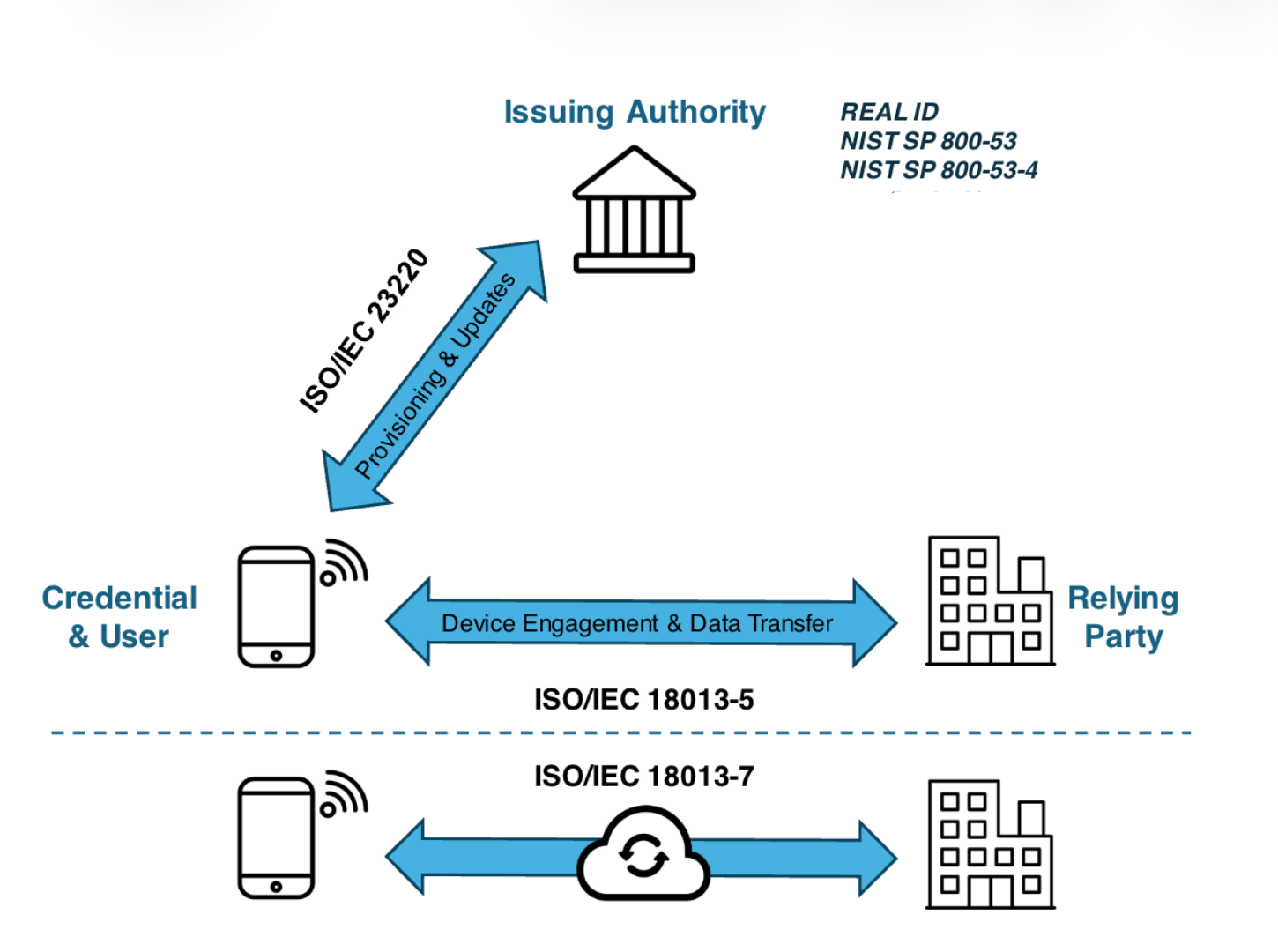
Trust model diagram showing issuing authority, credential and user, relying party, and ISO/IEC 18013 standards
04

How does in-person mDL presentation and verification work

01

Device Engagement

The verification process begins when the holder presents their mobile driver's license to a Tap2iD Verifier using NFC tap, QR scan, or Bluetooth.

This step signals the holder's intent to share their credential and allows the phone and verifier to discover each other.

02

Connection Establishment

After engagement, the phone and the Tap2iD Verifier establish a secure encrypted session.

Both devices exchange cryptographic information and generate a session key, ensuring that all communication that follows is protected.

No credential data is transferred until this secure connection is established.

03

mDL Request

Tap2iD sends a DeviceRequest asking for the specific identity attributes required for verification.

Examples may include:

  • Name
  • Date of birth
  • Age over 21
  • Portrait photo
  • Document number

The request follows the ISO/IEC 18013-5 mDL protocol and ensures the holder shares only the requested information.

04

mDL Response

The wallet asks the holder to approve the request.

Once approved, the phone returns a DeviceResponse containing the requested identity attributes, the Mobile Security Object (MSO), and cryptographic proofs associated with the credential.

This response is securely transmitted to the verifier.

05

Data Integrity

Tap2iD verifies the Mobile Security Object (MSO) to confirm that the credential data has not been altered since issuance.

Each attribute inside the credential contains a cryptographic hash. The verifier recomputes these hashes and compares them to the signed values.

If any field has been modified, the verification fails.

06

mDL Cert Validity

Tap2iD checks the certificate used to sign the credential.

This ensures:

  • the certificate is valid
  • the certificate has not expired
  • the certificate chain is intact

This step confirms the credential was signed using a valid DMV-issued key.

07

mDL Authentication

Tap2iD verifies the issuer's digital signature contained in the Mobile Security Object.

This confirms that:

  • the credential was issued by the DMV
  • the signed data matches the original credential
  • the credential response has not been tampered with
08

Trusted Issuer Check

The verifier confirms that the issuing authority belongs to a trusted issuer registry.

Only credentials issued by recognized authorities — such as state DMVs — are accepted.

If the issuer is not trusted, the credential is rejected.

09

Verification Complete

After all checks pass:

  • secure session established
  • credential integrity verified
  • issuer signature validated
  • trusted issuer confirmed

Tap2iD returns a successful verification result to the relying organization. Only the approved identity attributes are shared, while the holder maintains full control of their mobile ID.

07

Which standards sit behind Tap2iD

â„šī¸
Management layer
Verify with Credence is the web portal used to configure verifier behavior, manage trust and data profiles, monitor activity, and support deployed verifier endpoints across hardware and SDK-based environments.
Standard
ISO/IEC 18013-5
Name
Mobile Driving Licence
What It Governs
In-person device engagement and data transfer between phone and verifier via NFC, QR, or Bluetooth.
Standard
ISO/IEC 23220 (draft)
Name
Mobile eID Framework
What It Governs
How the issuing authority provisions and updates credentials on the user's device.
Standard
ISO/IEC 18013-7 (draft)
Name
Online Presentations
What It Governs
Extends the mDL standard to remote and online verification through a secure cloud relay.
StandardNameWhat It Governs
ISO/IEC 18013-5Mobile Driving LicenceIn-person device engagement and data transfer between phone and verifier via NFC, QR, or Bluetooth.
ISO/IEC 23220 (draft)Mobile eID FrameworkHow the issuing authority provisions and updates credentials on the user's device.
ISO/IEC 18013-7 (draft)Online PresentationsExtends the mDL standard to remote and online verification through a secure cloud relay.