Tap2iD VDS for Windows - API Reference
Reference for the Windows VDS REST API: endpoints, request and response formats, and operating modes.
Introduction
The Windows Verifier Device Service (VDS) is a software development kit from Credence ID that provides a REST API for developers/integrators to communicate with the Tap2iD® Verifier from Windows applications.
Service Overview
- Adds in-person identity verification to your business application.
- Provides APIs to integrate the Tap2iD reader with a Windows (thick or thin) client application.
- Adds digital ID verification to any Windows PC.
- Supports Tap2iD-initiated and operator-initiated verification flows.
- Runs as a Windows Service on Windows 10/11.
Overview of Functions
| Category | API | Description |
|---|---|---|
| Device Mgmt. | GetReaderInfo |
Returns Tap2iD reader information: device make/model, OS version, network status/SSID, reader profile, etc. |
GetReaderConnectionStatus |
Returns the connection status between the reader and the Windows PC. | |
SetReaderProperties |
Sets device parameters such as USB operation mode, reader profile, and WiFi settings. | |
| Verification | ReadIDInfo |
Reads the digital ID (mDL) the holder shares and collects ID attributes. |
StopReadID |
Stops or cancels a Read ID operation before the device has engaged. | |
| Utilities | Display |
Displays text and an image on the Tap2iD screen. |
UpgradeTap2iD |
Upgrades the Tap2iD Reader App via APK upload or remote version check. |
Tap2iD Operating Modes
The Tap2iD device supports these operating modes:
Standalone Mode
Scanned data is not sent to VDS over USB. VDS can still connect to the device, GET/SET reader properties, and change operating modes.
Holder Driven Mode
Data read by the Tap2iD is sent to VDS over USB. The reader is always ACTIVE and accepts any NFC, mDL, or non-mDL QR scan the holder triggers.
Host Driven Mode
Tap2iD is activated when VDS receives a ReadIDInfo API request from the client application. Once the transaction completes (or via Stop API), Tap2iD becomes passive.
Workflows
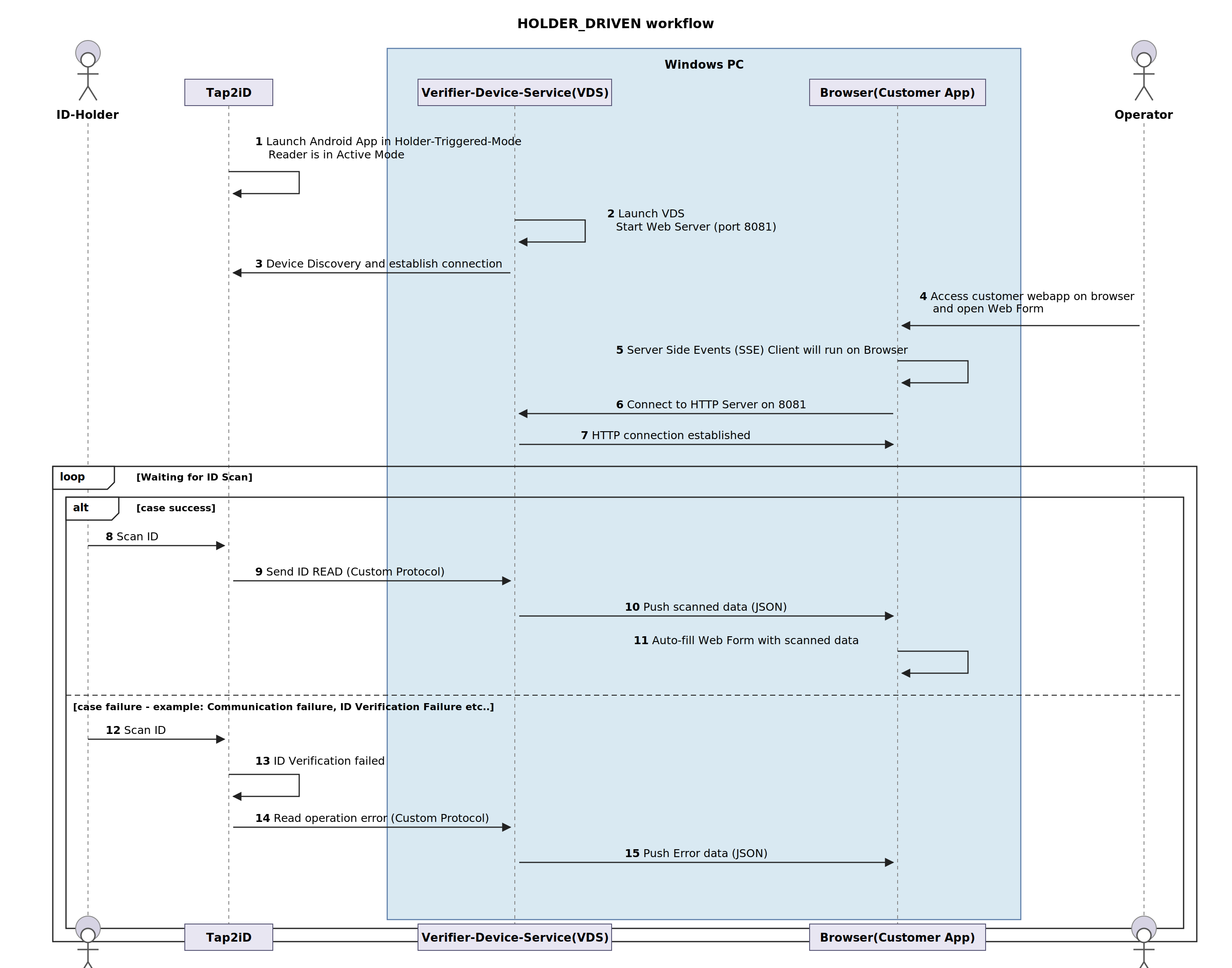
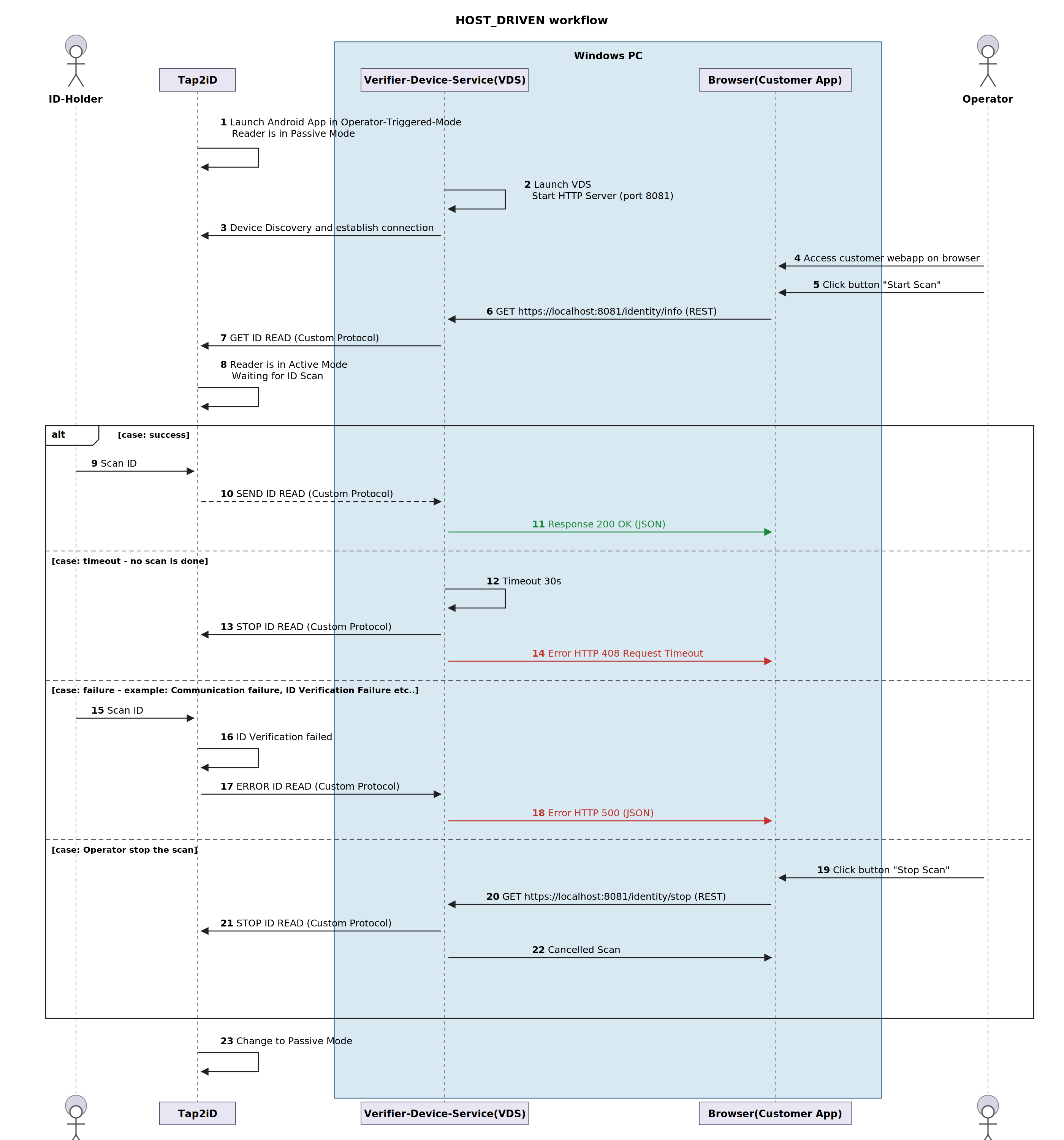
API Specifications
Public APIs for Tap2iD device settings, mDL and physical ID reads, and device management. Base URL: https://localhost:4215/verifier-sdk
Returns Tap2iD reader information: device make/model, OS version, network status/SSID, reader profile, and current device state.
https://localhost:4215/verifier-sdk/reader/info
None
{
  "deviceMakeAndModel": "cIDReader",
  "osVersion":         "cIDReader 11 eng 1.0.0_8",
  "applicationVersion": "0.22.0-velociraptor",
  "vdsVersion":        "1.3.4",
  "usbMode":           "HOST_DRIVEN",
  "debugMode":         false,
  "readerProfile":     "ID Check",
  "networkStatus":     true,
  "networkSsidStatus": "WiFi-5G",
  "deviceState":       "CONNECTED"
}| Value | Description |
|---|---|
| NOT_CONNECTED | The device is plugged out |
| CONNECTED_DEBUG | Device is plugged in but set into DEBUG mode (not for regular operation) |
| CONNECTED_MTP | Device is plugged in but cannot communicate with VDS yet (temporary state) |
| CONNECTED | Device is connected and can communicate with Tap2iD (correct operational state) |
| Field | Possible Values |
|---|---|
| usbMode | STANDALONE, HOLDER_DRIVEN, HOST_DRIVEN |
| readerProfile | ID Check Profile, AGE Check Profile, CUSTOM Profile |
{ "errorCode": 513, "errorMessage": "Generic Error" }{ "errorCode": 515, "errorMessage": "Service busy with another operation, try after sometime" }Checks and returns the current connectivity status of the Tap2iD device with the Windows PC.
https://localhost:4215/verifier-sdk/reader/connection/status
None
{ "deviceState": "CONNECTED" }Sets device configuration including USB mode, reader profile, and WiFi settings.
https://localhost:4215/verifier-sdk/reader/properties
{
  "setting": "Reader_Profile",
  "value": {
    "profile": "ID_CHECK" // ID_CHECK, AGE_CHECK, CUSTOM_CHECK
  }
}{
"setting": "Wifi",
"value": {
"SSID": "xxxxxx",
"Password": "xxxxxx",
"Type": "WPA" // WPA, WEP, None
}
}{
"setting": "USB_mode",
"value": {
"mode": "HOST_DRIVEN" // HOST_DRIVEN, HOLDER_DRIVEN, STANDALONE
}
}// Empty body: 200 OK indicates success{ "errorCode": 513, "errorMessage": "Generic Error" }{ "errorCode": 515, "errorMessage": "Service busy with another operation, try after sometime" }Initiates and reads mDL data from the digital ID holder and collects various ID attributes as per the active reader profile of the Tap2iD device. Supports mDL (ISO18013), QR Code, and PDF417 (physical DL).
https://localhost:4215/verifier-sdk/identity/info?timeout=30&deviceEngagement=…
| Parameter | Type | Required | Description |
|---|---|---|---|
| timeout | integer | Optional | USB Read Timeout in seconds. After this timeout, VDS sends a stop command to Tap2iD. Default is configured in application.properties (30s). |
| deviceEngagement | string | Optional | Device Engagement String from a 3rd-party barcode reader. URL-encode if it contains special characters. |
{
  "docType":              "IDENTITY",
  "transactionID":       "",
  "deviceID":            "",
  "validationErrorCode": 100,
  "validationErrorMessage": "",
  "data": {
    "type":              "ISO18013",
    "familyName":       "Doe",
    "givenNames":       "Stefan",
    "birthDate":        "",
    "issueDate":        1678304350,
    "expiryDate":       1678304350,
    "issuingCountry":   "",
    "issuingAuthority": "CredenceID",
    "documentNumber":   "987654321",
    "portrait":         "", // JPEG encoded base64 string
    "drivingPrivileges": [
      {
        "vehicleCategory": "A",
        "issueDate":       1729382400,
        "expiryDate":      1729382400,
        "codes": [{ "code": "", "sign": "", "value": "" }]
      }
    ],
    "sex":              "Male",
    "isAgeOver18":      true,
    "isAgeOver21":      true,
    "residentAddress":  "",
    "residentCity":     "",
    "residentState":    "",
    "residentPostalCode": "",
    "residentCountry":  ""
    // ... additional fields available
  }
}{
"docType": "QR_CODE",
"transactionID": "",
"deviceID": "",
"data": {
"qrCodeData": ""
}
}{
"docType": "IDENTITY",
"transactionID": "",
"deviceID": "",
"validationErrorCode": 100,
"data": {
"type": "AAMVA_DL_ID",
"familyName": "DAVID",
"givenNames": "AVA NONE",
"birthDate": "1992-01-10",
"issuingCountry": "USA",
"documentNumber": "G4841292",
"sex": "FEMALE",
"residentAddress": "123 N CAPITOL AVE",
"residentCity": "SAN JOSE",
"residentPostalCode": "95133",
"isAgeOver18": false,
"isAgeOver21": true
}
}{ "errorCode": 513, "errorMessage": "Generic Error" }{ "errorCode": 515, "errorMessage": "Service busy with another operation, try after sometime" }Cancels a READ ID operation initiated earlier. Tap2iD may or may not be able to stop depending on whether mDL has already been scanned.
https://localhost:4215/verifier-sdk/identity/stop
- mDL not yet scanned: Tap2iD stops READ ID and switches to "Waiting for host" screen. ReadIDInfo returns HTTP 500.
- mDL already scanned: Tap2iD cannot stop. The mDL data is sent to VDS but VDS does not forward it to the client. ReadIDInfo still returns HTTP 500.
None
"ID READ stop request has been successfully submitted""STOP cannot be invoked"
// Occurs when no pending ReadIDInfo operation exists or STOP API cannot be invokedDisplays any text or image sent to Tap2iD on its screen.
https://localhost:4215/verifier-sdk/reader/display
{
  "image":    "",  // (String) JPEG image encoded as base64: max 100kb
  "text1":    "",  // (String) Line 1 of message: max 15 chars
  "text2":    "",  // (String) Line 2 of message: max 15 chars
  "duration": 10   // (Integer) Duration in seconds: min 1, max 60
}| Field | Type | Constraint |
|---|---|---|
| image | string | JPEG base64, max 100 KB |
| text1 | string | Max 15 characters |
| text2 | string | Max 15 characters |
| duration | integer | Min 1, Max 60 seconds |
{ "errorCode": 513, "errorMessage": "Error occurred during display" }{ "errorCode": 515, "errorMessage": "Service busy with another operation, try after sometime" }Upgrades the Tap2iD Reader App. Supports direct APK upload or remote version check via the Verify with Credence (VwC) backend.
https://localhost:4215/verifier-sdk/reader/upgrade
app field takes precedence over checkUpdates: if an APK is uploaded, VDS will not check for remote updates.| Field | Type | Description |
|---|---|---|
| app | MultiPartFile | APK file to upload directly to the HTML form. Takes precedence over checkUpdates. |
| checkUpdates | string | "yes": VDS checks VwC backend for the latest Tap2iD version and downloads it. "no": skip remote check. |
// Empty body: 200 OK indicates upgrade initiated successfully{ "errorCode": 513, "errorMessage": "Error occurred" }{ "errorCode": 515, "errorMessage": "Service busy with another operation, try after sometime" }How to Receive Scan Data in HOLDER_DRIVEN
In HOLDER_DRIVEN mode, the ID data received by the VDS is pushed to the customer application through Server Sent Events (SSE) and WebSocket endpoints.
The call below establishes a long-lasting HTTP connection with the VDS web service. It can be invoked automatically, for example as part of an HTML onload event. Listeners should listen to the specific events shown.
var source = new EventSource("https://localhost:4215/verifier-sdk/sse/read/{clientID}");

// Data received has the same model as the ReadIDInfo API response
// Developer can parse the data to fill up a web form or further process it
source.addEventListener('SCANNED_DATA', function(e) {
  var obj = JSON.parse(e.data);
}, false);

source.addEventListener('ERROR_DATA', function(e) {
  var obj = JSON.parse(e.data);
}, false);Primary WebSocket Connection
| URL | wss://localhost:4215/verifier-sdk/ws/{'{'}clientID{'}'} (if SSL is enabled) |
| Protocol | WebSocket |
| clientID | Unique identifier for the client (e.g. client1) |
Connection URL Example
# For HTTPS mode (if SSL is enabled)
wss://localhost:4215/verifier-sdk/ws/client1
Management Endpoints
GET /verifier-sdk/ws/status/{'{'}clientID{'}'} | Check connection status |
GET /verifier-sdk/ws/clients | Get connected clients count |
GET /verifier-sdk/ws/disconnect/{'{'}clientID{'}'} | Force disconnect a client |
Outbound Messages (Server to Client)
{
  "type": "SCANNED_DATA",
  "data": {
    // HolderIDInfoResponse object containing scanned ID data
  },
  "timestamp": 1697299200000
}{'

'}{
  "type": "ERROR_DATA",
  "data": {
    // Error object containing error details
  },
  "timestamp": 1697299200000
}
Inbound Messages (Client to Server)
"ping"— Client ping message; server responds with"connected"- Text messages — Connection health monitoring